With the hardware ready, the server needs an operating system. Ubuntu is the chosen platform, with its LTS release, currently 20.04. It just needs to be installed with the minimum required components, and setup with the server hardware, especially the hard drive in a RAID 1 configuration.
Solution
Ubuntu is installed with the minimum components initially. Only the required packages to run the hardware, and be able to access it remotely with SSH.
The physical disks are setup in a software Raid configuration and split into partitions:
- 100GB used for the root partition (/).
- 100GB for the home partition (/home).
- and the rest as the data partition (/data).
Overall, the disks setup looks like:
| Mount point | / | /home | /data |
|---|---|---|---|
| partitions | md0p1 100GB |
md0p2 100GB |
md0p3 2.5TB |
| RAID Device | md0: 3TB |
||
| Hard drive A | sda: 3TB |
||
| Hard drive B | sdb: 3TB | ||
Getting Ubuntu
 From the Ubuntu website, you can download an installation image. I chose the 64bits installer image.
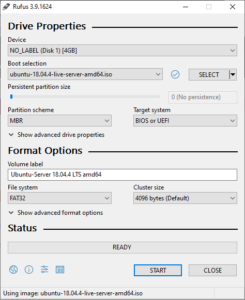
The image can be burned on a CD, but as I don’t have a CD drive on the server, I’ll burn the ISO on a USB drive. I use Rufus to burn the image to the USB drive.
In Rufus, choose the device target, select “Disk or ISO image”, and select the ISO image just downloaded. Make sure the right USB drive is selected, it is going to be formatted and delete all data on it. Once confirmed, click on Start.
When finished, we have a USB drive ready to install Ubuntu.