To provide the network services at home, I need a server platform. So how do I choose the hardware, and setup this homemade server.
Background
In computing, server is a very vast subject, so to put things in perspective, here are the requirements:
- Use as little power as possible. Has to be cheap to run.
- Last many years. I don’t want to upgrade the hardware often
- Be modular, so I can add hardware when required: more hard disks, expansion cards, memory…
- Have basic standard connectivity, like USB and Gigabit network card. Audio and video can have minimum specs, they won’t be used much.
- As economical as possible
- Have some sort of hard drive protection. Raid 1 is enough
- Meet Ubuntu Server minimum specification
The server is to be installed in the attic, so the look is no issue: the server will be hidden from view.
I did consider some ARM based platform, like some of the Odroid boards, but the form factor limited the expansion options, hard drive setup, maximum memory, expansion cards and being future proof for several years.
Solution
After researching building the server myself or getting a second hand PC, I opted for the later. I can get better value for my money that way. A second hand PC can be bought for a 100 euros or less, with enough specs to satisfy most of the requirements.
PC platform
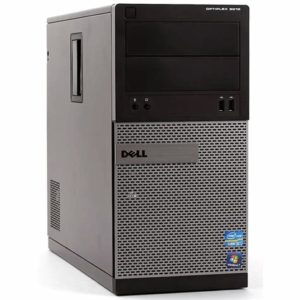
I managed to get a Dell OptiPlex 3010, with an Intel I5 processor at 3.2GHz, 16GB of DDR3 RAM and 500GB hard drive in a mini tower format for 100 euros. It is a great foundation for the server.
With it, I get:
- Quad-Core I5 3rd generation processor i5-3470
- Supports up to 16GB of RAM, with an 8GB DDR3 1600 DIMM module in each slot. Not the fastest RAM, but I’m not after the fastest, biggest, baddest server: it needs to work for me.
- 1x Gigabit network card. It will be able to manage the load of serving files, streaming TV, photos or videos to several clients concurrently, and serve basic services quickly.
- 4x SATA2 3Gb/s connectors. Not the latest and fastest SATA interface, but at 300MB/s transfer rate, it is plenty for home use. It also allows me to add 2 hard drives in RAID 1 configuration to protect against a hard drive failure.
- 8x USB2 connectors. Plenty to add TV tuners or other interfaces, like a Z-Wave controller or UPS.
- 1x PCIe x16 and 3x PCIe x1 slots. Plenty to add expansion cards, like TV tuners, extra SATA or USB3 controllers…
- VGA and HDMI ports so I can connect screen and keyboard to setup the operating system.
Memory
The PC came with 16GB of DDR3 1600 RAM.
The 1600 in the RAM notation corresponds to a transfer rate, and means it supports 1600 millions transfers per second: 1.6GT/s.
So what is this in bytes? Well, a DDR3 module has a data bus 64 bits wide, and a byte has 8 bits, it means the module transfer 8 bytes per transaction (64bits is equal to 8 bytes). So with 1600 MT/s, and 8 bytes per transaction, it transfers 8×1600 MB/s, or 12800MB/s. That’s why DDR3 1600 is also named PC3-12800.
16GB is way overkill for ordinary home use. It will however come in handy when I want to run several virtual hosts at the same time. 2GB would be plenty without the virtualization requirement.
Hard drives
My size requirements for hard drive actually decreased in the last few years. I used to keep a copy of my DVDs and CDs on hard drive, but with streaming services now available for music and movies, I don’t use CDs or DVDs anymore. I need storage for photos and home videos, documents, archives and some backups. I also have a few virtual hosts setup, so having some spare storage is always handy.
I had one 3TB hard drive I used before in a NAS. I’ll reuse it in the server.
To have redundancy with the hard drive, I need another identical drive, so I bought a second 3TB.
I can setup the 2 hard drives in a RAID 1 configuration. RAID stands for “Redundant Array of Independent Disks”. It’s basically a way to organize hard drives to provide performance gain, redundancy or both. RAID 1, also known as disk mirroring, use 2 identical disks in parallel. The disks mirror the content of each other. So when something gets written to the disk array, it is written to both disks. It is therefore limited to the write speed of slowest disk. When reading data, because we can read from 2 disks at the same time, we can achieve higher read transfer rates.
Should one hard drive fails, the second hard drive remains operational, and the system can continue operating without disruption. The important thing is to setup some sort of alerts, so when a disk fails, I get notified so I can replace it. If the second drive fails, everything is lost.
RAID is not a way to backup data, it just prevents data loss in case of a hard drive failure. Hard drives eventually fails, so it is a preventive measure.
The hard drives are the green line from Seagate and Western Digital. Green is for lower power usage. The second drive I got is the Western Digital. It has comparable performance to the Seagate drive, but uses nearly half the power. They’re both 3.5″ form factor and fit easily in the computer case.
| Hard Drive | Manufacturer | Capacity | Power | RPM | Interface |
| BarraCuda ST3000DM001 | Seagate | 3TB | 8.0W | 7200 | Sata 6 – 3Gb/s |
| Caviar Green WD30EZRX | Western Digital | 3TB | 4.1W | 5400 | Sata 6 – 3Gb/s |
Expansion Cards
For TV streaming, I want to be able to stream HD channels from Free to Air satellite and terrestrial channels. That means the server needs some DVB-S2 and DVB-T digital TV receiver.
I had a Hauppage Win-TV Duet for terrestrial TV. It is a USB receiver, with two tuners. So it can watch or record at least 2 channels at the same time. It is connected to a USB2 connector at the back of the server. A basic antenna will sit on top of the server. I don’t need to connect it to an external antenna.
For satellite channels, I ordered a DVBSKy S952 Dual DVB-S2 receiver. It has a PCI-E 1x connector, so fits on the motherboard, and has two tuners, so again, can record or watch 2 channels at the same time. It is fitted in one of the PCIe 1x slot of the motherboard.
When choosing a tuner card, just make sure it is supported by the operating system you’re using. On Linux, the LinuxTV website can be a great resource.
UPS
The server is protected against loss of power or power surges with an Uninterruptible Power Supply, or UPS. I had an old but operational MGE Ellipse 1000 unit. I just replaced the 2 batteries to give it a new lease of life. It connects to the server with a USB port.